


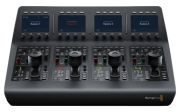
Blackmagic-Design ATEM Camera Control Panel
from £2,677.381 offer
- Compact unit for remote control of cameras
- Compatible with URSA Broadcast, URSA Mini, Blackmagic Studio, and Blackmagic Micro Studio Cameras
- Control of up to 4 different cameras simultaneously
- Adjustment of technical parameters such as black level, gain, color balance, and shutter speed
- Portable unit, can be installed at the workstation or in a pull-out rack tray
- Controls are logically arranged and easy to find

Popular Products
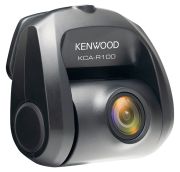
Kenwood KCA-R100
£69.00
Peak Design Slide Lite
£53.99
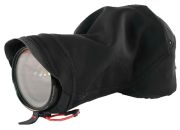
Peak Design Shell Small
£49.95

Polaroid B&W Film i-Type
£18.95
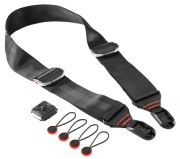
Peak Design Slide
£69.99
1 Offer
Sort by:
Best Match
Best Match
Price: Low to high
Price: High to low
Include Shipping
Blackmagic Design ATEM Camera Control Panel SWPANELCCU4
Remotely control four cameras. all from a single control panel!The ATEM Camera Control Panel is a compact remote camera control unit designed to control up to four different URSA Broadcast. URSA Mini. Blackmagic Studio or Blackmagic Micro Studio cameras. The control panel features traditional broadcast style controls and adjustments so a single person can monitor and adjust a wide range of technical parameters such as black levels. gain. color balance. shutter speed and more. This leaves your camera operators free to focus on the more creative aspects of live production such as framing and composition. Unlike traditional CCU controllers. which have to be installed into a desk. the ATEM Camera Control Panel has been designed to be portable so it can simply be placed on any desktop or bolted down so it can be mounted in a slide out rack shelf. The controls are arranged in a familiar and logical layout. making it perfect for both experienced and new operators. Plus. it works with all ATEM switcher models!Control Four CamerasOne person can control 4 cameras!When working on live multi camera programs. it’s important to make sure all of the cameras are properly balanced and set up correctly so that you get consistent video from every angle. The ATEM Camera Control Panel features 4 camera controllers in one panel. Each camera controller includes a large LCD screen with soft buttons and knobs at the top of the panel. and a full set of professional controls below. on the main body of the panel.Scene and Camera ControlsThe top section lets you save and recall scene presets so you can quickly adjust cameras based on changes in the scene such as lighting. This section also includes controls for adjusting master gain. white balancing the camera and changing the camera’s shutter speed.White BalanceQuickly set and adjust white balance.Load ScenesSave and recall scene presets.Master GainBoost sensitivity of sensor in low light or when more depth of field is needed.Shutter SpeedSet the shutter speed of the camera.BarsSelect to output color bars for the selected camera.Gain and Pedestal ControlsThe center section features independent RGB controls for gain and pedestal. or white and black. This allows you to adjust the individual red. green and blue levels in your blacks and whites to compensate for unwanted color.WhiteIndependent RGB control for gain/whites.BlackAdjust the RGB values for pedestal/blacks.Lens and Iris ControlsThe bottom section features an LED camera number that indicates preview and on air status. along with a high quality professional joystick that’s used to precisely adjust the iris and master black. It also features a call button for talkback with the operator. along with a panel lock button and indicators for the network. power and cable connection to the camera.Iris ControlJoystick for adjusting iris and master black. Adjust up and down for iris. rotate for master black and push to select camera to monitor.Coarse ControlSets the limit of the iris control on the joystick.Iris and Master BlackLocks the iris and master black controls on the joystick to prevent accidental changes.Master BlackControls the degree or level of black/pedestal without affecting contrast.Panel ActiveLock out the entire panel to prevent accidental changes.Status LightsIndicate network connectivity. alarms and cable integrity.PreviewUsed for sending the aux feed to the monitor so you don’t have to move the joystick.Camera NumberLED dot display that indicates camera number and on air/preview status.Call ButtonFlashes tally light and sends tone to get operator’s attention.Live Production WorkflowWorks seamlessly with ATEM switchers!The ATEM Camera Control Panel connects directly to your ATEM live production switcher or ATEM hardware control panel via Ethernet. In many setups. you may be using multiple ATEM products such as an ATEM 4 M/E Broadcast Studio 4K switcher with an ATEM 1 M/E Advanced Panel and the ATEM Camera Control Panel. Ethernet can simply b
Standard delivery in 3 working days

£2,677.38
£2,677.38
Shipping: Free
Shipping: Free
Product Details
| Compact unit for remote control of cameras |
| Compatible with URSA Broadcast, URSA Mini, Blackmagic Studio, and Blackmagic Micro Studio Cameras |
| Control of up to 4 different cameras simultaneously |
| Adjustment of technical parameters such as black level, gain, color balance, and shutter speed |
| Portable unit, can be installed at the workstation or in a pull-out rack tray |
| Controls are logically arranged and easy to find |
Popular Products