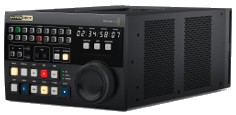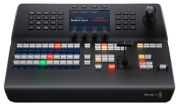

Blackmagic-Design ATEM 1 M/E Advanced Panel
- Hardware panel
- LCD and joystick
- Compatible with Blackmagic ATEM switcher models
- Connections: 2x Ethernet, 1x USB-C for firmware updates
- Dimensions: 430 x 162 x 389 mm
- Weight: 5.74 kg
Price History
1M 3M
Blackmagic-Design ATEM 1 M/E Advanced Panel
Price AlertPriceMachine Price
Popular Products
Kenwood KCA-R100
£69.00

Zeiss Lens Cleaning Kit
£29.95

Polaroid Color Film 600
£15.00
Sigma EVF-11
£510.09
Calibrite Display Pro HL
£356.92


4 Offers
Sort by:
Best Match
Best Match
Price: Low to high
Price: High to low
Include Shipping

Blackmagic Design ATEM 1 M/E Advanced Panel 20 SWPANELADV1ME20
The ATEM 1 M/E Advanced Panel 20 is a single M/E. 20 input button switching panel that includes the features and flexibility needed for switching big and small productions in a highly portable and compact design. It has 2 independent system control LCDs plus it can control up to 4 M/Es in larger switchers. All input buttons include LCDs for custom labeling and there is an independent select bus. Dual power inputs provide redundancy and the built-in 4 port Ethernet switch means no additional network equipment is needed so it will fit even the most challenging live production spaces!
Standard delivery in 3 working days

£2,842.07
£2,842.07
Shipping: Free
Shipping: Free

Blackamgic Design ATEM 1 M/E Advanced Panel
Built in LCD and high quality curved buttons Professional joystick for DVE and camera adjustments 12 Month Limited Manufacturer's

£2,978.75
£2,978.75
Shipping: Free
Shipping: Free

Blackmagic Design ATEM 1 M/E Advanced Panel 10 407122
Blackmagic Design ATEM 1 M/E Advanced Panel 10 DESCRIPTION The new ATEM 1 M/E Advanced Panel 10 is an elegantly designed professional hardware control panel for all ATEM switchers. It combines modern design with the latest broadcast technology for faster workflows. The new design features a built in LCD and high quality curved buttons that help reduce incorrect key presses. The buttons also have colour backlighting to help you quickly recognize important keys. You also get a professional joystick for DVE and camera adjustments smooth weighted t-bar fader and much more. The buttons feature dynamic displays that allow full customization of the labels as well as custom colours. The shift buttons allow you to double up the number of inputs by selecting a second set of shifted source buttons so you can control up to 20 inputs. The compact size and durable design of the ATEM 1 M/E Advanced Panel 10 fits in a standard equipment rack making it perfect for shelf mounting in broadcast trucks mobile racks and fly away kits. FEATURES • Professional hardware control panel for all ATEM switchers • Features a built in LCD and high quality curved buttons that help reduce incorrect key presses • The buttons also have colour backlighting to help you quickly recognize important keys • You also get a professional joystick for DVE and camera adjustments smooth weighted t???bar fader and much more • The buttons feature dynamic displays that allow full customization of the labels as well as custom colours • The shift buttons allow you to double up the number of inputs by selecting a second set of shifted source buttons so you can control up to 20 inputs • The compact size and durable design of the ATEM 1 M/E Advanced Panel 10 fits in a standard equipment rack making it perfect for shelf mounting in broadcast trucks mobile racks and fly away kits Features Type Control Panels

£3,147.69
£3,147.69
Shipping: Free
Shipping: Free
Blackmagic Design ATEM 1 M/E Advanced Panel 20 422663
Blackmagic ATEM Larger 1 M/E hardware panel - 20 Input Buttons For the ultimate in professional control you can add an optional ATEM Advanced Panel. Although you can use ATEM Constellation with the software control panel using an ATEM Advanced Panel is so much faster. ATEM Advanced Panels open up the power of your ATEM Constellation because they give you an enormous amount of control allowing you to setup more complex effects. It's also a nicer way to work because you have physical broadcast quality buttons knobs and a t???bar fader so you can access all features in the switcher all at the same time. Imagine using the 4 M/E model to access all M/Es simultaneously with an input button for every single SDI source on the ATEM Constellation switcher. SELECT SOURCES SWITCH CAMERAS TO AIR INSTANTLY ATEM Constellation has been designed to give you the most advanced live switching workflow. Internally ATEM Constellation has separate program and preview buses that you can use to quickly and accurately switch sources. ATEM Constellation lets you see your preview bus selection by using an aux output or on the multi view. Then all you need to do is make selections on the preview bus of the ATEM Advanced Panel which will appear on your preview screen allowing you to see your source before it goes on air. Then you can bring the source online by pressing cut or auto. You can also switch sources on the program bus if you need them to go live immediately. TRANSITION CONTROL SELECT AND CUSTOMIZE TRANSITIONS Get total control over your transitions with a dedicated hardware button for each transition type. When selecting transition types a system control LCD screen will display the options for that transition so you can change its parameters without navigating through complex menus. It's all instantly available. That gives you multiple ways to switch. Simply select a new source on the preview bus then press CUT for a cut transition or AUTO to use the selected transitions such as mix dip wipe or DVE. You can even cut directly on the program bus. With ATEM Advanced Panels you get all the controls you need to access all transition types fast. TRANSITION STYLES MIX DIP WIPE DVE AND MORE ATEM switchers give you a huge range of transition styles. Mix transition will smoothly blend between sources just like an NLE cross dissolve. Standard SMPTE wipes are included and wipes can have edge softening for smooth dreamy transitions that are more exciting than simple cross dissolves. Dip transitions create a dip to colour effect however because you can dip to any video source you could create really innovative effects. DVE transitions use the DVE to create crazy moves where the whole foreground image moves. Plus you can combine the DVE and a still image from the media pool to create graphic wipes. The t-bar fader even lets you manually position the transition for total control. WIPE TRANSITIONS TRANSFORM WIPES INTO EXCITING EFFECTS Power up your wipe transitions by accessing parameters to transform them into exciting effects. While you can select the wipe pattern directly on the LCD you can also add lots of customization to suit your production style. You can adjust parameters such as symmetry and softness but there are also adjustments for coloured borders with variable width and softness as well as the position of the centre of the wipe. You can even use the dedicated joystick to set precise wipe pattern positioning. DVE TRANSITIONS AMAZING DIGITAL VIDEO EFFECTS ATEM Advanced Panels are perfect for positioning the DVE for custom picture in picture effects because they include a joystick. The joystick allows the position to be set precisely and rotating the knob will change DVE size. You can also use the soft knobs and menus on the LCD to adjust the DVE position size and other DVE features such as lighting and drop shadow effects. The DVE can be setup to fly graphics into frame or select any of the pre programmed push and squeeze transitions. KEYER CONTROL GE

£3,613.74
£3,613.74
Shipping: Free
Shipping: Free
Product Details
| Hardware panel |
| LCD and joystick |
| Compatible with Blackmagic ATEM switcher models |
| Connections: 2x Ethernet, 1x USB-C for firmware updates |
| Dimensions: 430 x 162 x 389 mm |
| Weight: 5.74 kg |
Price History
1M 3M
Blackmagic-Design ATEM 1 M/E Advanced Panel
Price AlertPriceMachine Price
Popular Products